Lessons and files
Post lessons, handouts and links by subject and section. Students open them on their phones, anytime.
Seedara is a ready-made class website on your own Google account. Post lessons and quizzes, keep your class record, message students, take absence reports, and send notifications to their phones. You pay once.
One-time payment. No monthly fees. Team discounts for schools. Pay with GCash, Maya, MariBank or GoTyme.
Everything in one place
Students sign in with their section and a personal PIN on any phone. You run everything from the teacher view.
Post lessons, handouts and links by subject and section. Students open them on their phones, anytime.
Students answer on their phones and their results come straight to you, ready to record.
Written works and performance tasks in one record. Students see their own scores; scores can be recorded automatically.
Make different groups for every performance task, then score a whole group in one go.
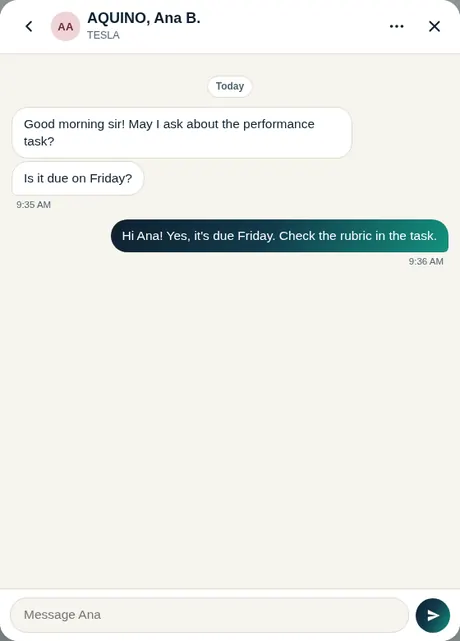
Text-style chat with your students. Reply to one student or message a whole section at once.
Students report an absence with photos of their excuse letter. You read it and answer from the app.
New lessons, announcements, "due tomorrow" and missing-work reminders reach students' phones.
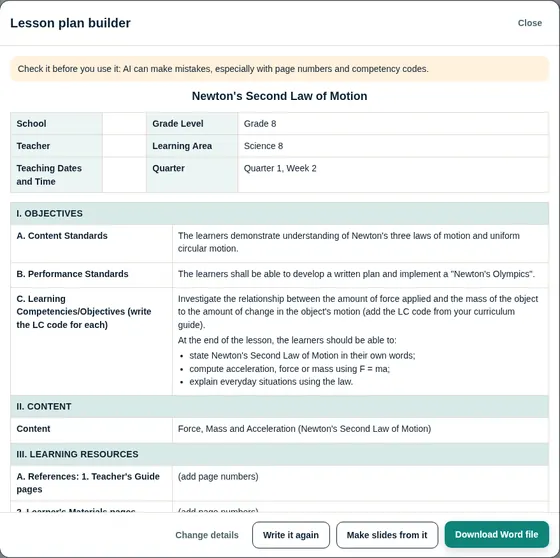
DepEd DLP/DLL, detailed, semi-detailed, 5E, or your school's own Word template. Download it as a Word file.
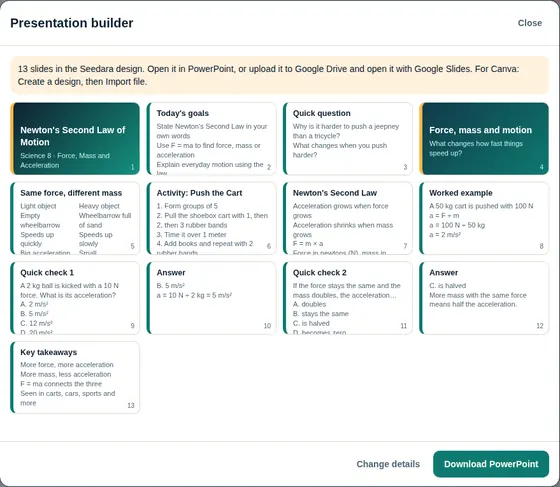
Classroom slides with quiz slides and speaker notes, in a clean design or your own template. Opens in PowerPoint, Google Slides or Canva.
Also inside: flashcards, announcements and reminders, school links, color themes, your own site name and tab icon, and extras for science classes (simulations and daily science trivia). The AI builders (Deluxe) use your own free Google Gemini key.
See it in action
These are real screens from Seedara, filled with sample names.
How it works
No coding. The setup guide walks you through every click.
Scan the QR code in the order form and pay the exact amount.
Upload a screenshot of the receipt with your name and email.
Once your payment is confirmed, your Get my Seedara link and the step-by-step guide arrive in your inbox.
It runs on your own Google account. Share the link with your students and you're live.
Price
No subscription and no hosting bills. Seedara runs on your own Google account, and your students' work and scores stay in your own Google Drive.
One person pays for everyone. Each teacher gets their own Seedara and their own support.
Each license is for one teacher and one Google account. By ordering, you agree to the .
Already have Seedara? and pay only the difference.
Got a promo code? .
Orders are paused for now. Message us and we'll tell you when they open.
Questions before you buy? Message us.
Free setup
Pick a time that suits you. We'll set up Seedara with you on your own Google account, step by step, in about 45 minutes.
FAQ
No. You pay once and Seedara is yours. There are no monthly fees.
A Google account (a free Gmail works) and a computer for the first setup, which takes about 30 minutes. Your students only need a browser on a phone or computer.
In your own Google Drive. Seedara runs on your Google account, so the seller can't see your students, their work or their scores.
No. Seedara runs on Google Apps Script, which is free with your Google account. Phone notifications use a small website on a free Cloudflare account; the guide shows you how.
Every plan has the complete class website: lessons, quizzes, exams, performance tasks, flashcards, the class record and announcements. Pro adds messages with your students, phone notifications and absence reports. Deluxe also adds the AI Lesson Plan and Presentation builders, and future updates.
One license is for one teacher and one Google account, for your own classes. Sharing or reselling Seedara, or setting it up on more accounts than you paid for, isn't allowed. The full also appear in your Seedara the first time you sign in.
Yes, anytime. Use Upgrade your plan on this page (or the Upgrade button inside Seedara), pay only the difference, and the new features turn on by themselves. Nothing to reinstall, and your class data stays.
On Deluxe, the AI builders use your own free Google Gemini key, which takes about a minute to get. Google sets daily limits on free use.
Upload your receipt in the order form. Once your payment is confirmed, your Get my Seedara link and the step-by-step guide arrive in your email.
Help with setting up and using Seedara, for 30 days depending on your plan, counted from the day your order is confirmed.
On Pro and Deluxe, we set up Seedara with you on your own Google account. After your order is confirmed, we'll message you to book a time.
Deluxe includes future updates: we email you each new version. The other plans include the current version of Seedara.
Yes. Choose how many teachers in the order form and list their emails. One person pays once, and each teacher gets their own Seedara and support.
Made in a real classroom. Seedara was built by Mark Alvin R. Duripa, LPT, a Filipino science teacher, for his own classes. It grew one feature at a time from what his students needed.
From the classroom
Shared with their permission by students who use Seedara in class.